Online Stopwatch – Free, Fast and Simple to Use
If you need a stopwatch online that opens in a second and works without any download, you are in the right place. This stopwatch runs in your browser, counts up in hours, minutes, seconds and hundredths of a second, and stays out of your way. Press Start, do your thing, and press Pause when you are done. There is no account to create and nothing to install.
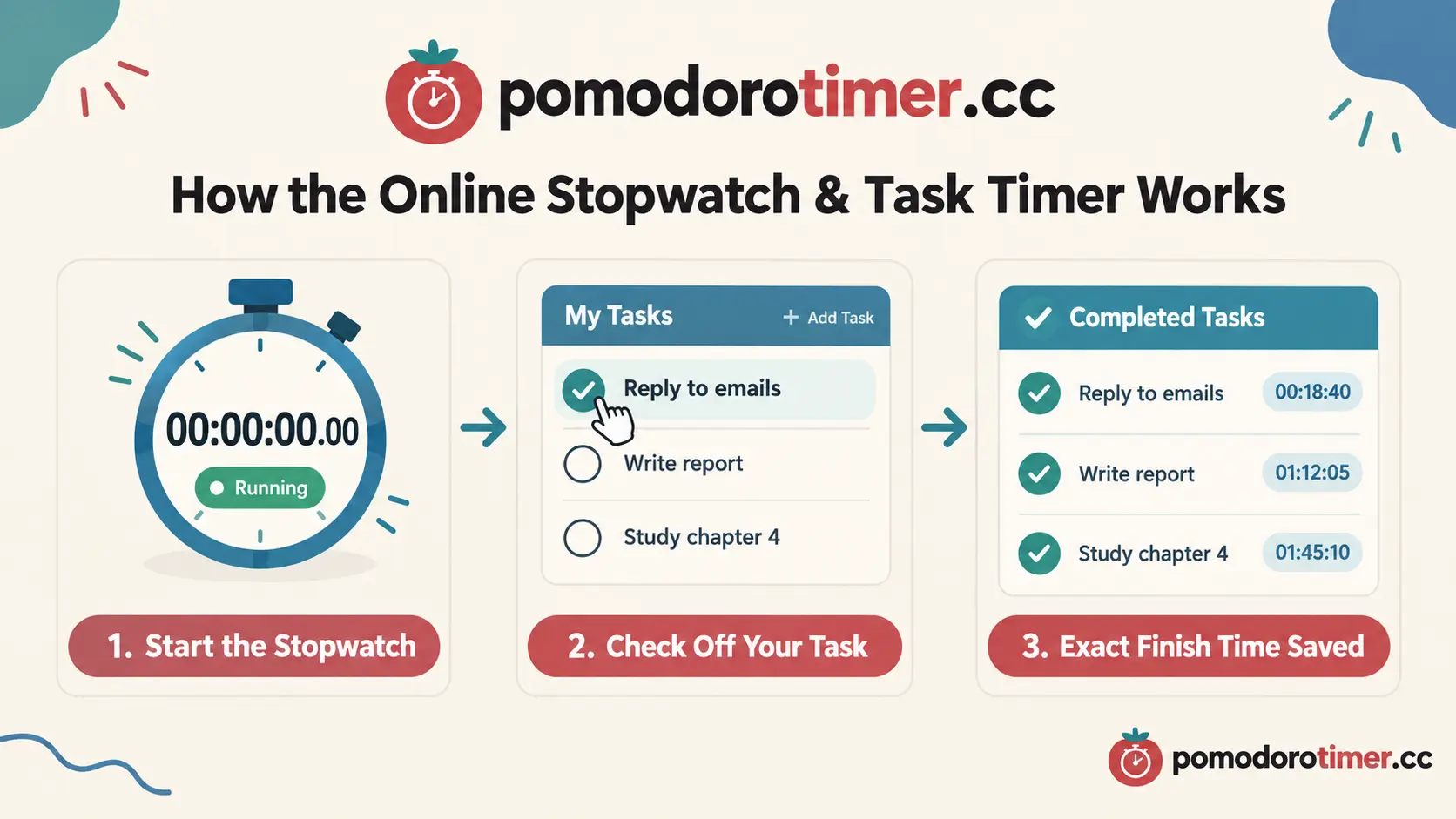
What makes this page a little different is the task list. You can add your tasks, and the moment you tick one off, the exact stopwatch time is saved right next to it. So at the end of a session you can see how long each piece of work took, not just how long the whole session lasted.
What Is an Online Stopwatch?
An online stopwatch is a digital clock that counts upward from zero. A countdown timer works the other way round: you decide the time first and wait for it to end. A stopwatch has no set limit. You start it when the activity begins and stop it when the activity ends, and the number on the screen is your result.
Because it lives in a web page, you can use it on a laptop, a tablet or a phone. Anything with a browser will do. You do not need to find a physical stopwatch or hunt for an app.
Stopwatch vs. Timer – Which One Do You Need?
People often mix these up, so here is the simple version.
Use a stopwatch timer (counting up) when you do not know how long something will take, or when you want to measure it. Running a lap, reading a chapter, solving a maths problem, cooking a dish for the first time: all of these are measurements.
Use a countdown timer when you already have a fixed amount of time, such as a 25-minute work block or a 10-minute break. If that is what you need, our Timer and Pomodoro pages are one click away in the menu at the top of this page.
How to Use This Stopwatch Online
Using it takes about five seconds to learn.
- Press the white Start button, or hit the Space bar on your keyboard.
- Watch the time count up. The time also appears in your browser tab, so you can switch to another tab and still see how long you have been going.
- Press Pause if you need a break. The time is held exactly where it stopped.
- Press Resume to continue from the same point.
- Press Reset when you want to start again from zero.
That is all. There are no hidden steps and no sign-up pop-ups.
Keyboard Shortcuts
If you like keeping your hands on the keyboard, these shortcuts save a lot of clicking:
- Space – start, pause or resume the stopwatch
- R – reset to zero
- T – open the task list and start typing a new task
- D – switch dark mode on or off
Track Every Task With Its Exact Finish Time
This is the feature most people end up liking best. Open the task list, type what you are working on, and press Add task. When you finish it, tick the circle. The stopwatch time at that exact moment appears next to the task, for example 00:24:18.50.
Completed tasks are sorted in the order you finished them, and the time stays saved even if you refresh the page. If you tick a task by mistake, untick it and the time disappears, so you can try again.
A Simple Example
Say you start the stopwatch and work through three jobs: replying to emails, writing a report and tidying your desk. You tick off the emails at 00:18:40, the report at 01:12:05 and the desk at 01:20:30. A glance at the list tells you the report took you roughly 53 minutes. Next time you plan your day, you will know what to expect.
Stopwatch for Study – A Smarter Way to Learn
A stopwatch for study is one of the most useful and least talked-about study tools. Most students guess how long they study. Guessing is almost always wrong, usually in the flattering direction. When you actually measure it, you learn what your real study habits look like.
Why Students Use a Stopwatch
Here is why it works so well for studying:
- You see your real focus time. Start the stopwatch when you open the book and pause it when you check your phone. At the end of the day you have an honest number.
- You learn how long subjects take. Maybe chemistry notes take you 40 minutes per chapter and history takes 25. Now you can plan your week properly.
- It builds a habit. Watching the numbers grow gives you a small reason to keep going a little longer.
- It is good for practice papers. Time yourself on a past paper and see whether you can finish in the exam time.
How to Set Up Your Study Session
Write each topic as a task: "Biology chapter 4", "Maths exercise 7", "Revise vocabulary". Start the stopwatch and begin with the first one. When you finish a topic, tick it off and carry on without stopping the clock. Over a few weeks you will build a good picture of how long each kind of work takes you.
A Small Tip for Longer Sessions
Take a short break every hour or so. Pause the stopwatch while you are away, so that your break does not count as study time. Press Resume when you are back.
Who Else Can Use This Stopwatch Timer?
Although it is handy for students, the same stopwatch timer suits many other situations.
Workouts and Sports
Time your plank holds, rest between sets, a run around the block or a swimming drill. The hundredths of a second make it accurate enough for casual sprint timing.
Work and Freelancing
If you bill by the hour or just want to know where your time goes, run the stopwatch while you work on a client project. Add each deliverable as a task and you will see exactly how long each one took.
Cooking and Everyday Jobs
Some things are hard to time ahead because you do not know how long they will take. Proofing dough, steeping tea, or cleaning the kitchen are all examples. Start the stopwatch and check back whenever you like.
Presentations and Speeches
Practising a talk? Start the stopwatch, speak through your slides, and see whether you are inside your time limit. Do it a few times and note the improvement.
Games and Challenges
Speed-solving a puzzle, a quiz night with friends or a kids' race in the garden. A stopwatch makes any of them more fun.
Features at a Glance
- Counts up to hundredths of a second
- Start, pause, resume and reset
- Built-in task list with the finish time saved for each task
- Time shown in the browser tab title
- Dark mode while the stopwatch runs, which is easier on the eyes
- Three colour themes: red, teal and blue
- Keyboard shortcuts
- Works on desktop, tablet and mobile
- Free, with no sign-up
Tips for Getting the Most Out of Your Stopwatch
- Keep the tab open. The stopwatch keeps counting in the background, and the time stays visible in the tab title. Switching to another window will not affect your time.
- Use clear task names. "Chapter 5 questions" is better than "study". Specific names make your results easier to read later.
- Start the clock before you start the work. It sounds obvious, but many people begin working and forget to press Start. A good habit is to press Start first, then open your book or your document.
- Review your times. The numbers beside your tasks are not just for show. Look at them at the end of the day. They tell you what to expect tomorrow.
Frequently Asked Questions
Is this online stopwatch really free?
Yes. It is free to use, and you do not need to sign up or enter an email address.
Does the stopwatch keep running if I switch tabs?
Yes. It is based on your device's clock, so it stays accurate when you move to another tab or window. The elapsed time is also shown in the tab title.
Will my tasks be saved?
Your tasks and their finish times are saved in your own browser, so they are still there when you come back. They are not uploaded anywhere. If you clear your browser data, they will be removed.
Can I use this stopwatch on my phone?
Yes. The page adjusts to smaller screens, and the buttons are large enough to tap easily.
How accurate is it?
It shows hundredths of a second, which is more than enough for study sessions, workouts and everyday timing. For official sports timing you would of course need professional equipment.
Can I use it as a stopwatch for study every day?
Of course. Many students keep the page open all day and use it for each study block. The task list helps you see how your time was spent.
Start Your Stopwatch Now
You do not need anything fancy to understand where your time goes. Press Start, work on what matters, and tick off each task as you finish it. Whether you want a quick stopwatch online for a one-off job or a regular stopwatch for study companion, this page is ready whenever you are. Scroll back up and give it a try.